


CVS Specialty
3.11.28K Reviews
App Specs
- Version
- 2.84
- Updated On
- License
- Free
- Downloads
- 500,000+
- Developer
- CVS Pharmacy
- Categories
- Medical
- Platform
- Android, iOS
Screenshots
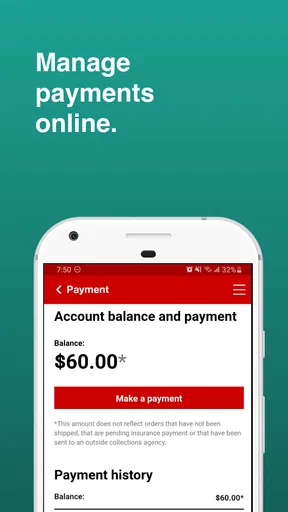
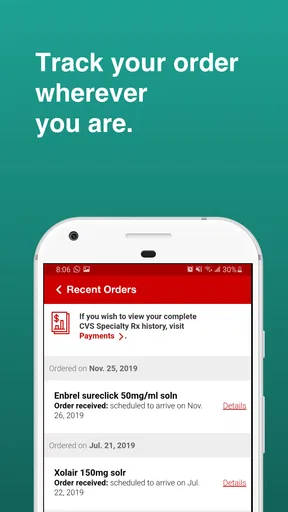
 Analysis by AppCompare
When I decide whether a pharmacy app is worth keeping, I look beyond convenience: does it fit the way I receive a particular prescription, help me stay organized between refills, and make routine tasks easier rather than adding another place to check? That is the useful lens for CVS Specialty. It is a free medical app from CVS Pharmacy focused on specialty-medication tasks, so it makes most sense for people whose prescriptions and pharmacy care already fit that service. It is less compelling if you mainly need a general pharmacy app for everyday purchases or prescriptions handled elsewhere.
Start with the kind of medication support you need
Specialty prescriptions can involve more coordination than picking up a standard refill. For me, the key question is whether I want one place to keep an eye on medication-related tasks: arranging an order, checking its progress, and building a routine around reminders. The app’s emphasis on specialty medications and adherence tracking gives it a narrower purpose than a broad health organizer, and that focus is its clearest reason to choose it.
It is also worth being realistic about what an app can do. A reminder can help me remember a dose, and an order-status view can make the wait less uncertain, but neither replaces advice from a clinician or a conversation with the pharmacy when a prescription or delivery needs attention. I would use the app to support the routine, not as the only place I keep important treatment instructions.
Where a focused pharmacy app earns its place
The strongest case is for someone who already manages specialty prescriptions through CVS Specialty and wants routine tasks close at hand. Instead of relying on memory or searching through messages when a refill is due, I can use a dedicated app as a practical checkpoint. That separation can be helpful if my other health apps are already crowded with appointments, lab results, and general wellness tools.
There is a useful habit-building angle here, too. I would set reminders around the schedule I have been given, then treat them as prompts to check in with myself rather than proof that a dose was taken. Tracking adherence works best when I update it consistently; if I dismiss reminders automatically or rarely open the app, the record can become less useful than a simple written routine.
CVS Pharmacy’s app has an average rating of 3.2 from around 2,800 ratings, and it has been installed over 500,000 times. Those figures suggest that it has reached a substantial group of users, but they are not a guarantee that every account or workflow will feel smooth. I would weigh that public response alongside the practical question of whether its specialty-pharmacy focus matches my needs.
When another option may suit you better
If my prescriptions are filled by a different pharmacy, that pharmacy’s own app is usually the more direct choice for order-related tasks. A general medication-reminder app may also be a better fit if I need to track medicines from several providers in one place. Those alternatives solve different problems: a pharmacy app is centered on that provider’s service, while a broader organizer is useful when my medication list crosses provider boundaries.
Worth Reading Before You Choose

EA SPORTS FC Mobile 26 Is a Bigger Football Game, but It Takes Time

Flipboard Shows What News Apps Must Do Beyond the Feed

Switching to Android Auto Means Rethinking Your Driving Routine

Google Calendar Makes a Crowded Week Easier to Manage

Ludo King Makes the Most of the Minutes Between Plans

Baby Panda World Brings Quick Play to Modern Phones, but Its Game Library Feels Busy
I would not choose this app simply because I want a comprehensive medical record or a way to compare pharmacies. Its purpose is more specific. Before relying on it, I would confirm that my specialty prescription is connected to the CVS Specialty service and that I can access the account associated with it. If I cannot get past that basic setup, the app’s reminders and order tools will not make much difference.
Make the switch without disrupting your routine
If you are moving from phone alarms, paper notes, or another reminder tool, keep the old method in place until you have successfully signed in and set up the new routine. I would also compare the reminder schedule in the app with the instructions I already follow, rather than assuming that importing or entering a medication automatically captures every detail correctly. This small check helps prevent a convenient interface from becoming a source of confusion.
For a realistic day-to-day example, imagine a refill is approaching while you are planning a busy week. I would check the prescription in the app, take any available order step, and use the status information as a reference instead of repeatedly calling just to ask whether anything has changed. If the status seems unclear or the timing matters, I would contact the pharmacy directly; the app is useful for visibility, but a direct conversation is the better route for resolving an unusual case.
Getting Started: First Impressions
Hey there! So, I recently got my hands on the CVS Specialty app, and let me tell you, it’s been quite the journey. If you’re dealing with specialty medications, this app might just become your new best friend. Let’s dive into my experience with it and see if it’s worth downloading.
Diving into the CVS Specialty app was pretty straightforward. Setting up my account was a breeze. All you need is your prescription information, and you’re good to go. The user interface is surprisingly clean and intuitive, which is a big plus for anyone who isn’t tech-savvy. It guides you step-by-step, making sure you don’t miss anything important.
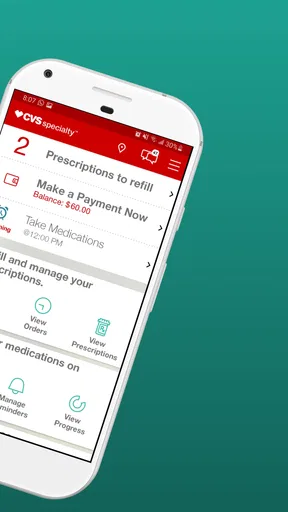
One thing that caught my eye right away was how everything is neatly organized. You’ve got your prescriptions, order status, and even payment options all in one place. No more fumbling around trying to find what you need—it’s all right there at your fingertips.
Features That Stand Out
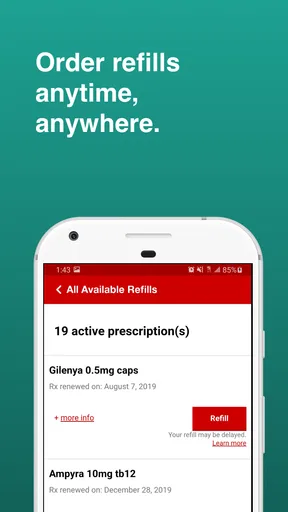
Now, let’s talk about the features that make this app a game-changer for those of us managing specialty medications. First off, the prescription management tool is a lifesaver. It lets you keep track of all your meds, refill them with a tap, and even set reminders so you never miss a dose. Trust me, this is a big deal when you’re juggling multiple prescriptions.
Another feature I absolutely love is the order tracking. Once you’ve placed an order, you can track its status in real-time. No more guessing when your meds will arrive or making frantic calls to the pharmacy. Plus, you get notifications for everything from shipping updates to refill reminders, which is super handy.
Payment options are also seamless. You can save your payment information for quick access and even use your insurance to cover costs directly through the app. It’s these little conveniences that make a big difference in the long run.
What Could Be Improved?
Of course, no app is perfect, and there are a couple of things that could enhance the user experience. For starters, the app sometimes logs you out unexpectedly, which can be a bit annoying. It’s not a deal-breaker, but having to log back in repeatedly can get a bit tiresome.
Also, while the app is generally intuitive, some areas could benefit from clearer instructions. For example, navigating through insurance paperwork within the app can be a little confusing at times. Adding more detailed guides or a help section would definitely help users feel more at ease.
Final Thoughts: Is It Worth It?
So, after spending some quality time with the CVS Specialty app, I’d say it’s definitely worth checking out if you manage specialty medications. The convenience it offers is unmatched, and it’s clear that a lot of thought has gone into making the user experience as smooth as possible.
While there are a few minor hiccups, they’re far outweighed by the app’s benefits. From managing prescriptions to handling payments seamlessly, this app covers all the bases. If you’re looking for a reliable way to manage your meds, this could be just what you need.
Give it a try and see for yourself. You might just wonder how you ever managed without it!
Practical checks before relying on it
For someone deciding whether to install it, the main practical question is what happens when a task does not go as expected. A refill that needs clarification, an insurance detail that is hard to interpret, or an order that seems stalled may call for help from the pharmacy rather than more tapping around. I would keep the pharmacy’s contact route available and use the app for routine visibility, not assume that every exception can be solved in-app.
The app is free and rated for Everyone, which makes trying it a low-cost way to see whether its workflow suits you. It was released on December 6, 2014, and the current version is 2.82, with Android 8.0 as the minimum operating system. Those details help with basic compatibility decisions, but the more important test is whether your phone runs it reliably and whether your CVS Specialty account connects as expected.
One subtle trade-off with reminders is that more notifications do not automatically mean better adherence. I would start with only the prompts that support a real part of my routine, then adjust if they become background noise. Likewise, order notifications are most useful when they help me decide whether to take action; checking them repeatedly without a specific concern can turn a convenience into another source of distraction.
Who I would recommend it to
I would recommend giving it a try if you use CVS Specialty for your medication, want a dedicated place to review prescription and order information, and are comfortable checking an app as part of your routine. It may be especially useful when several refill-related tasks compete for attention, because keeping those details together can reduce the need to reconstruct what is happening from memory.
I would skip it as my primary solution if my prescriptions are spread across pharmacies, if I need one consolidated medication list, or if I prefer not to manage health tasks on a phone. In those cases, a cross-provider medication organizer, a paper schedule, or the relevant pharmacy’s own service may be a better fit. I would also avoid treating a reminder or status screen as a substitute for professional guidance when a dose, delivery, or coverage question affects care.
My recommendation
Overall, I see this as a focused tool rather than an all-purpose health app. Its value depends on the match between your specialty prescription and CVS Specialty, and on whether you will use its reminders and order information consistently. If that match is there, the app can make recurring pharmacy tasks easier to manage. If it is not, a different pharmacy app or a broader medication tracker will likely serve you better.
Pros
- User-friendly interface for easy navigation.
- Quick access to prescription details.
- Secure handling of personal information.
- Timely notifications for refills.
- Comprehensive customer support options.
Cons
- Occasional app performance lags.
- Limited features compared to competitors.
- Login process can be cumbersome.
- Requires stable internet connection.
- Some users report notification delays.
FAQs for CVS Specialty
What services does the CVS Specialty app provide?
The CVS Specialty app offers a range of services tailored to help users manage their specialty medications. These include ordering refills, tracking shipments, viewing prescription details, and accessing important health resources. The app aims to simplify medication management, ensuring users have all necessary tools at their fingertips.
Is the CVS Specialty app available for both Android and iOS devices?
Yes, the CVS Specialty app is available for download on both Android and iOS platforms. Users can find it on the Google Play Store for Android devices and the Apple App Store for iOS devices. This ensures a wide range of users can benefit from its features, regardless of their device preference.
How secure is the CVS Specialty app in handling personal information?
The CVS Specialty app prioritizes user privacy and security. It employs encryption and other security measures to protect users' personal and health information. Users should ensure they have the latest app version installed to benefit from ongoing security updates and improvements.
Can I use the CVS Specialty app to communicate with my healthcare provider?
While the CVS Specialty app offers some communication features, its primary focus is on medication management. Users can view prescription details and order refills, but direct communication with healthcare providers might require additional steps outside the app. It's advisable to check with your provider for integrated communication options.
Are there any costs associated with using the CVS Specialty app?
Downloading and using the CVS Specialty app is free of charge. However, users should be aware that standard data charges from their mobile carrier may apply when using the app. Additionally, costs related to the medications themselves will depend on users' insurance plans and specific prescriptions.


